Visual Studio 2010 – Snippet Support
This week I have been playing around with the Beta 1 of Visual Studio 2010 and one thing I have to say I like is the new Snippet Support. We're all used to using it's InteliSense support allowing us to only type <aso:Bu and then hit space if we wanted to add a .NET button control to the page, but Snippets takes that a step further. Have a look at this example of adding a MultiView control to the page.
Adding A MultiView Control
The normal method would be to type <asp:Multi and then hit space to complete the word, followed by adding an ID, runat etc. All of which would be made easier with the current InteliSense support. Now though you can just type <mu and the Multiview snippet will be highlighted.
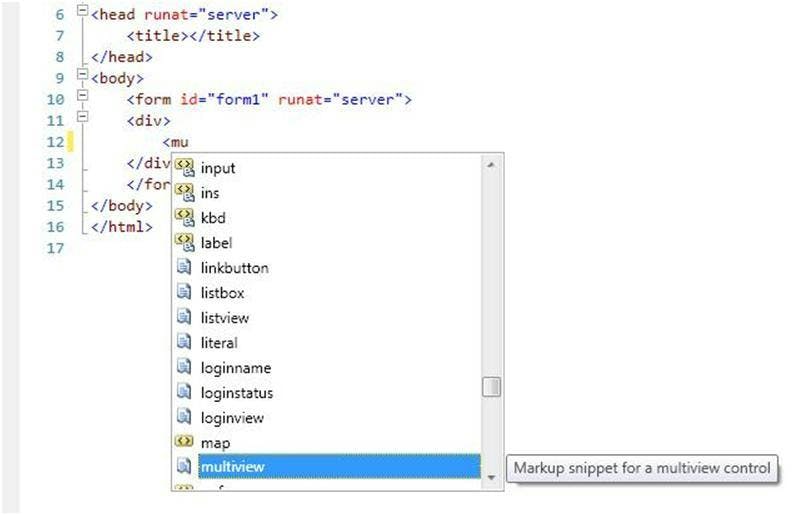
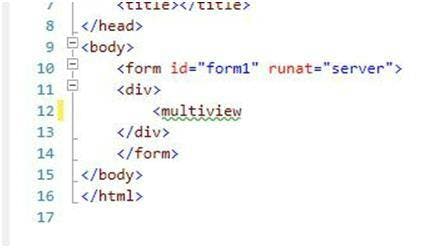
Hit tab and the word will be completed as below.
Hit tab again though and all the other stuff you were about to type is entered for you.
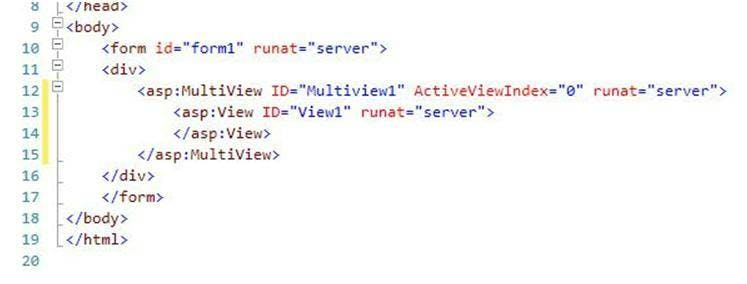
An auto ID is given, the runat and activeviewindex properties are also written for you along with the first view automatically added.
Snippet support isn't just limited to .NET controls either, it will also work with HTML markup and JavaScript.
HTML Example
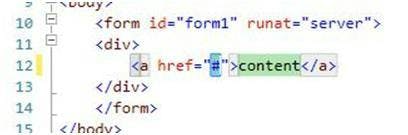
In this HTML example of an "A" tag you can see as simple as an "A" tag may be, snippets can save you time even here by automatically writing the whole thing, and then recognising that you will want to change the values of the two sections and thus makes that even easier by then letting you tab between the two sections.
So there you have it, we can now all wonder how we ever survived having to write the first couple of letters of each word, when really all we ever needed to do was write the first couple of letters of the main tag and have the rest written for us.