Tag: EF.Core
Add EF Core Migration Checks to CI

Add EF Core Migration Checks to CI

Have you ever had a deploy succeed but then your website error because the code didn't match the database? With Entity Framework Core using migrations this had started to become a thing of the past. The database model is defined in code and with a setup which checks for migrations needing to be applied, the database was always kept up to date. However this is exactly what has happened twice in the last few months in one of our dev environments, and the reason is AI.

EF Core Migrations are scripts that are generated based on your code models. A developer makes code changes to a model, runs the add migration script and the next time apply migrations is run (either through the app startup or another process), the migrations get applied to the DB.

1dotnet ef migrations add AddBlogCreatedTimestamp

However, if an AI tool like Copilot or Claude is being used by the developer you can run into a scenario where a migration script is attempted to be written by the AI, but isn't quite right. In our case it didn't add the .design file.

Now one solution to this is to update your AGENTS.md file to include instructions specifying that your migrations folder should only be updated via the dotnet ef migrations tools, but it would still be advantageous to have your CI tests detect the error and automatically fail the status checks on your PRs. After all this could happen for many other reasons like the changes being missed from a git commit.

Automatically detect model / migration inconsistencies

Fortunately the migration tools have a command to do this exact thing.

1dotnet ef migrations has-pending-model-changes

The has-pending-model-changes command will compare your migration code with the model and return true if changes exist.

If you already have unit tests in your code this can easily be added as a test.

1using MyApp.Infrastructure;
2using Microsoft.EntityFrameworkCore;
3using Npgsql;
4
5namespace Tests;
6
7public class HasEfModelChangesTests
8{
9 [Fact]
10 public async Task TestHasEfModelChanges()
11 {
12 await using var dataSource = CreateDataSource();
13 await using var dbContext = CreateDbContext(dataSource);
14
15 var hasChanges = dbContext.Database.HasPendingModelChanges();
16
17 Assert.False(hasChanges, "The EF model has pending changes. Add a new migration.");
18 }
19
20 // Mirrors the Program.cs setup so the model matches production. No connection is opened.
21 private static NpgsqlDataSource CreateDataSource()
22 {
23 var builder = new NpgsqlDataSourceBuilder("Host=localhost;Database=model_check");
24 builder.EnableDynamicJson();
25 builder.UseVector();
26 return builder.Build();
27 }
28
29 private static AppDbContext CreateDbContext(NpgsqlDataSource dataSource)
30 {
31 var options = new DbContextOptionsBuilder<AppDbContext>()
32 .UseNpgsql(dataSource, o => o.UseVector())
33 .Options;
34
35 return new AppDbContext(options);
36 }
37}
38

One thing to note in my example is that I am using Npgsql rather than an in memory database. Typically for unit tests I'd be using an in memory db and set the on model creating function to ignore any tables not relevant for the test.

In this case we are testing the whole model schema and my model includes data types such as jsonb and pgvector which aren't supported, so instead npgsql is used. No actual DB is required and the connection string is just a dummy connection string, it's just used to access the model building functionality.

Bulk Inserting data using Entity Framework

Bulk Inserting data using Entity Framework

Using tools like Entity Framework makes life far easier for a developer. Recently I blogged about how using them is what makes .Net Core one of the best platforms for prototype development, but the benefits don’t end there. They are also great from a security perspective by cutting a lot of risk around SQL injection attacks just by avoiding easy mistakes when using regular ADO.NET.

However, they do have some downsides, a main one being that they are particularly slow when it comes to doing bulk inserts to a database.

For example, assume you have an application which regularly receives an xml import file consisting of 200,000 records and each one either needs to be an insert of an update into the db. You’ll quickly learn that looping through the whole lot and then calling save changes results in a process taking an extremely long time to run, it may even just timeout. You then decide to get rid of that long save changes line by breaking it up into blocks of 500 and call save changes for each of those. That may save the timeout issue, but it still results in a process potentially lasting around an hour.

The problem is that this is a scenario Entity Framework or EF.Core just weren’t designed to handle. As a solution you could opt to drop Entity Framework altogether and revert to something like a native SQL Bulk Insert command, but what if you need to be doing some processing in code on the record before the import happens? What if you have one of those classic not quite always valid XML, XML files which would cause SQLs Bulk Insert to fail.

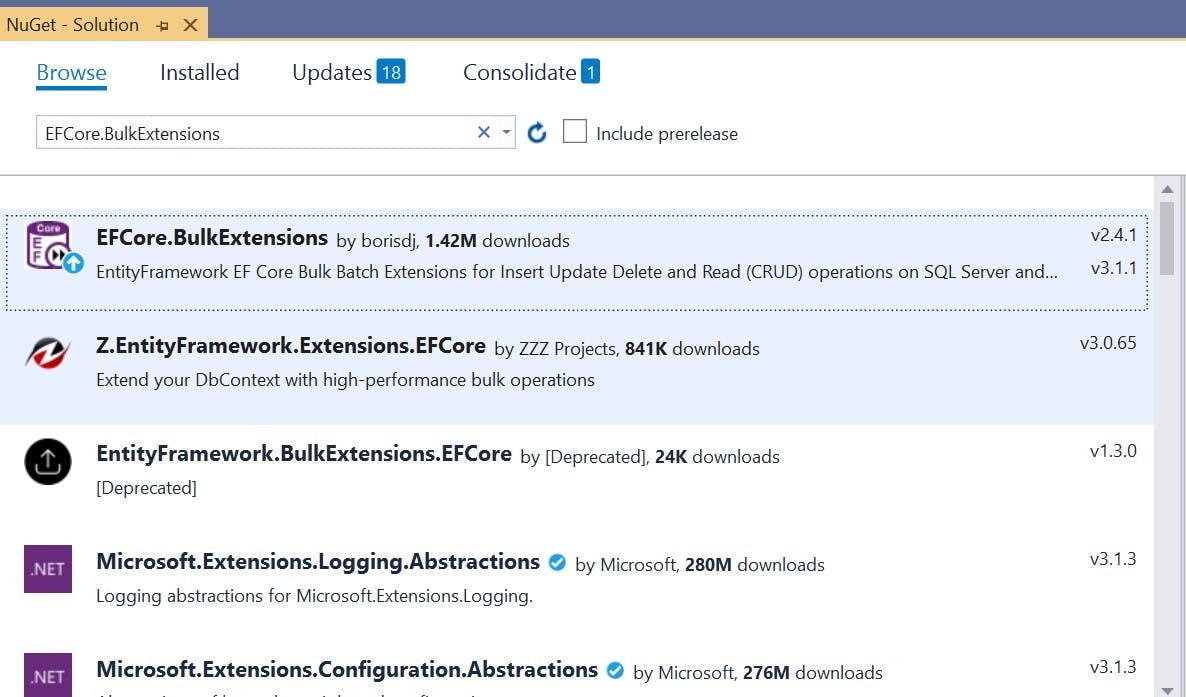
The solution is to use an open source extension called EFCore.BulkExtensions.

EFCore.BulkExtensions

EFCore.BulkExtensions is a set of extension methods to Entity Framework that provide the functionality to do bulk inserts. You can add it to your project using NuGet and you’ll find the project on GitHub here https://github.com/borisdj/EFCore.BulkExtensions

Usage is also very simple to do. Let’s assume you have some existing tradition EF code that loops through a collection and for each one create a new db item and adds it to the db:

1public void DoImport(List<foo> collection)
2{
3 foreach (var item in collection)
4 {
5 Jobs job = new Jobs();
6
7 job.DateAdded = DateTime.UtcNow;
8 job.Name = item.Name;
9 job.Location = item.Location;
10
11 await dbContext.Jobs.AddAsync(job);
12 }
13
14 await dbContext.SaveChangesAsync();
15}

Rather than adding each item to the Entity Framework db context, you instead create a list of those objects and then call a BulkInsert function with them on your db context.

1public void DoImport(List<foo> collection)
2{
3 List<Jobs> importJobs
4 foreach (var item in collection)
5 {
6 Jobs job = new Jobs();
7
8 job.DateAdded = DateTime.UtcNow;
9 job.Name = item.Name;
10 job.Location = item.Location;
11
12 importJobs.Add(job);
13 }
14
15 await dbContext.BulkInsert(importJobs);
16}

If also works for updates, but rather than creating a new item, first retrieve it form the db and then at the end call BulkInsertOrUpdate with the list.

1await dbContext.BulkInsertOrUpdate(importJobs);

From my experience doing this took my import process that would run for over an hour down to something which would complete in a few minutes.